Equal Cost Multipath Load Sharing
Cumulus Linux enables ECMP by default. Load sharing occurs automatically for IPv4 and IPv6 routes with multiple installed next hops. The hardware or the routing protocol configuration determines the maximum number of routes for which load sharing occurs.
ECMP operates only on equal cost routes in the RIB. For Cumulus Linux to consider routes equal, the routes must:
- Originate from the same routing protocol. Routes from different sources are not considered equal. For example, a static route and an OSPF route are not considered for ECMP load sharing.
- Have equal cost. If two routes from the same protocol are unequal, only the best route installs in the routing table.
When multiple routes are in the routing table, a hash determines through which path a packet follows. To prevent out of order packets, ECMP hashes on a per-flow basis; all packets with the same source and destination IP addresses and the same source and destination ports always hash to the same next hop. ECMP hashing does not keep a record of packets that hash to each next hop and does not guarantee that traffic to each next hop is equal.
Cumulus Linux enables the BGP maximum-paths setting by default and installs multiple routes. Refer to BGP and ECMP.
Next Hop Groups
ECMP routes resolve to next hop groups, which identify one or more next hops. To show next hop group information, run the nv show router nexthop group command or the vtysh show nexthop-group global command.
cumulus@leaf01:mgmt:~$ nv show router nexthop group
Via ID - Via ID, Interface - via interface, Vrf - via vrf

ID    Via ID     Interface  Vrf
----  ---------  ---------  ----
grp1  27.0.0.4
      27.0.0.5   swp23
grp2  28.0.0.4   swp3       red
grp3  34:22::48             blue
cumulus@switch:~$ sudo vtysh
...
switch# show nexthop-group global json
{
  "nexthopGroups":{
    "grp1":{
      "name":"grp1",
      "nexthops":[
        {
          "ip":"27.0.0.4"
        },
        {
          "ip":"27.0.0.5",
          "interfaceName":"swp23"
        }
      ]
    },
    "grp2":{
      "name":"grp2",
      "nexthops":[
        {
          "ip":"28.0.0.4",
          "interfaceName":"swp3",
          "targetVrf":"red"
        }
      ]
    },
    "grp3":{
      "name":"grp3",
      "nexthops":[
        {
          "ip":"34:22::48",
          "targetVrf":"blue"
        }
      ]
    }
  }
}
To show details of a specific next hop group, run the NVUE nv show router nexthop group <group-id> command or the vtysh show nexthop-group global <group-id> command.
cumulus@leaf01:mgmt:~$ nv show router nexthop group grp2
via
======
              interface  vrf
    --------  ---------  ---
    28.0.0.4  swp3       red
cumulus@leaf01:mgmt:~$ nv show router nexthop group grp2 via
          interface  vrf
--------  ---------  ---
28.0.0.4  swp3       red
cumulus@leaf01:mgmt:~$ nv show router nexthop group grp2 via 28.0.0.4
           operational  applied
---------  -----------  -------
interface  swp3         swp3
vrf        red          red
cumulus@leaf01:mgmt:~$ sudo vtysh
...
switch# show nexthop-group global grp2 json
{
  "nexthopGroups":{
    "grp2":{
      "name":"grp2",
      "nexthops":[
        {
          "ip":"28.0.0.4",
          "interfaceName":"swp3",
          "targetVrf":"red"
        }
      ]
    }
  }
}
ECMP Hashing
You can configure custom hashing to specify what to include in the hash calculation during load balancing between:
- Multiple next hops of a layer 3 route (ECMP hashing).
- Multiple interfaces that are members of the same bond (bond or LAG hashing). For bond hashing, see Bonding - Link Aggregation.
For ECMP load balancing between multiple next hops of a layer 3 route, you can hash on these fields:
Field |
Default Setting | NVUE Command | traffic.conf |
|---|---|---|---|
| IP protocol | on | nv set system forwarding ecmp-hash ip-protocol onnv set system forwarding ecmp-hash ip-protocol off |
hash_config.ip_prot |
| Source IP address | on | nv set system forwarding ecmp-hash source-ip onnv set system forwarding ecmp-hash source-ip off |
hash_config.sip |
| Destination IP address | on | nv set system forwarding ecmp-hash destination-ip onnv set system forwarding ecmp-hash destination-ip off |
hash_config.dip |
| Source port | on | nv set system forwarding ecmp-hash source-port onnv set system forwarding ecmp-hash source-port off |
hash_config.sport |
| Destination port | on | nv set system forwarding ecmp-hash destination-port onnv set system forwarding ecmp-hash destination-port off |
hash_config.dport |
| IPv6 flow label | on | nv set system forwarding ecmp-hash ipv6-label onnv set system forwarding ecmp-hash ipv6-label off |
hash_config.ip6_label |
| Ingress interface | off | nv set system forwarding ecmp-hash ingress-interface onnv set system forwarding ecmp-hash ingress-interface off |
hash_config.ing_intf |
| TEID (see GTP Hashing) | off | nv set system forwarding ecmp-hash gtp-teid onnv set system forwarding ecmp-hash gtp-teid off |
hash_config.gtp_teid |
| Inner IP protocol | off | nv set system forwarding ecmp-hash inner-ip-protocol onnv set system forwarding ecmp-hash inner-ip-protocol off |
hash_config.inner_ip_prot |
| Inner source IP address | off | nv set system forwarding ecmp-hash inner-source-ip onnv set system forwarding ecmp-hash inner-source-ip off |
hash_config.inner_sip |
| Inner destination IP address | off | nv set system forwarding ecmp-hash inner-destination-ip onnv set system forwarding ecmp-hash inner-destination-ip off |
hash_config.inner_dip |
| Inner source port | off | nv set system forwarding ecmp-hash inner-source-port onnv set system forwarding ecmp-hash inner-source-port off |
hash_config.inner-sport |
| Inner destination port | off | nv set system forwarding ecmp-hash inner-destination-port onnv set system forwarding ecmp-hash inner-destination-port off |
hash_config.inner_dport |
| Inner IPv6 flow label | off | nv set system forwarding ecmp-hash inner-ipv6-label onnv set system forwarding ecmp-hash inner-ipv6-label off |
hash_config.inner_ip6_label |
The following example commands omit the source port and destination port from the hash calculation:
cumulus@switch:~$ nv set system forwarding ecmp-hash source-port off
cumulus@switch:~$ nv set system forwarding ecmp-hash destination-port off
cumulus@switch:~$ nv config apply
Use the instructions below when NVUE is not enabled. If you are using NVUE to configure your switch, the NVUE commands change the settings in /etc/cumulus/datapath/nvue_traffic.conf which takes precedence over the settings in /etc/cumulus/datapath/traffic.conf.
- Edit the
/etc/cumulus/datapath/traffic.conffile:- Uncomment the
hash_config.enable = trueoption. - Set the
hash_config.sportandhash_config.dportoptions tofalse.
- Uncomment the
cumulus@switch:~$ sudo nano /etc/cumulus/datapath/traffic.conf
...
# HASH config for  ECMP to enable custom fields
# Fields will be applicable for ECMP hash
# calculation
#Note : Currently supported only for MLX platform
# Uncomment to enable custom fields configured below
hash_config.enable = true

#hash Fields available ( assign true to enable)
#ip protocol
hash_config.ip_prot = true
#source ip
hash_config.sip = true
#destination ip
hash_config.dip = true
#source port
hash_config.sport = false
#destination port
hash_config.dport = false
...
-
Run the
echo 1 > /cumulus/switchd/ctrl/hash_config_reloadcommand. This command does not cause any traffic interruptions.cumulus@switch:~$ echo 1 > /cumulus/switchd/ctrl/hash_config_reload
Cumulus Linux enables symmetric hashing by default. Make sure that the settings for the source IP and destination IP fields match, and that the settings for the source port and destination port fields match; otherwise Cumulus Linux disables symmetric hashing automatically. If necessary, you can disable symmetric hashing manually in the /etc/cumulus/datapath/traffic.conf file by setting symmetric_hash_enable = FALSE.
GTP Hashing
GTP carries mobile data within the core of the mobile operator’s network. Traffic in the 5G Mobility core cluster, from cell sites to compute nodes, have the same source and destination IP address. The only way to identify individual flows is with the GTP TEID. Enabling GTP hashing adds the TEID as a hash parameter and helps the Cumulus Linux switches in the network to distribute mobile data traffic evenly across ECMP routes.
Cumulus Linux supports TEID-based ECMP hashing for:
- GTP-U packets ingressing physical ports.
- VXLAN encapsulated GTP-U packets terminating on egress VTEPs.
For TEID-based load balancing for traffic on a bond, see Bonding - Link Aggregation.
GTP TEID-based ECMP hashing is only applicable if the outer header egressing the port is GTP encapsulated and if the ingress packet is either a GTP-U packet or a VXLAN encapsulated GTP-U packet.
- Cumulus Linux supports GTP Hashing on NVIDIA Spectrum-2 and later.
- GTP-C packets are not part of GTP hashing.
To enable TEID-based ECMP hashing:
cumulus@switch:~$ nv set system forwarding ecmp-hash gtp-teid on
cumulus@switch:~$ nv config apply
To disable TEID-based ECMP hashing, run the nv set system forwarding ecmp-hash gtp-teid off command.
Use the instructions below when NVUE is not enabled. If you are using NVUE to configure your switch, the NVUE commands change the settings in /etc/cumulus/datapath/nvue_traffic.conf which takes precedence over the settings in /etc/cumulus/datapath/traffic.conf.
-
Edit the
/etc/cumulus/datapath/traffic.conffile and change thelag_hash_config.gtp_teidparameter totrue:cumulus@switch:~$ sudo nano /etc/cumulus/datapath/traffic.conf ... #GTP-U teid hash_config.gtp_teid = true -
Run the
echo 1 > /cumulus/switchd/ctrl/hash_config_reloadcommand. This command does not cause any traffic interruptions.cumulus@switch:~$ echo 1 > /cumulus/switchd/ctrl/hash_config_reload
To disable TEID-based ECMP hashing, set the hash_config.gtp_teid parameter to false, then reload the configuration.
To show that TEID-based ECMP hashing is on, run the command:
cumulus@switch:~$ nv show system forwarding ecmp-hash
                   applied
-----------------  -------
destination-ip     enabled
destination-port   enabled
gtp-teid           enabled
...
ECMP Hash Buckets
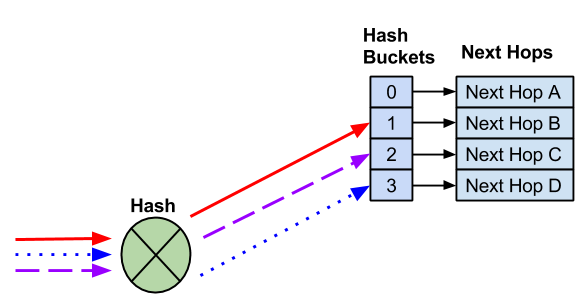
When there are multiple routes in the routing table, Cumulus Linux assigns each route to an ECMP bucket. When the ECMP hash executes, the result of the hash determines which bucket to use.
In the following example, four next hops exist. Three different flows hash to different hash buckets. Each next hop goes to a unique hash bucket.
The addition of a next hop creates a new hash bucket. The assignment of next hops to hash buckets, as well as the hash result, sometimes changes with the addition of next hops.
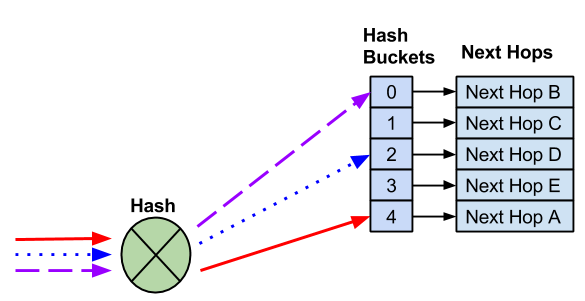
With the addition of a new next hop, there is a new hash bucket. As a result, the hash and hash bucket assignment changes, so the existing flows go to different next hops.
When you remove a next hop, the remaining hash bucket assignments can change, which can also change the next hop selected for an existing flow.
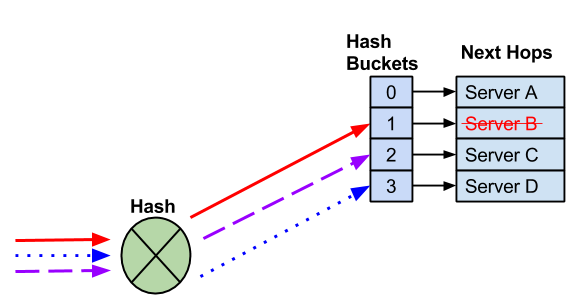
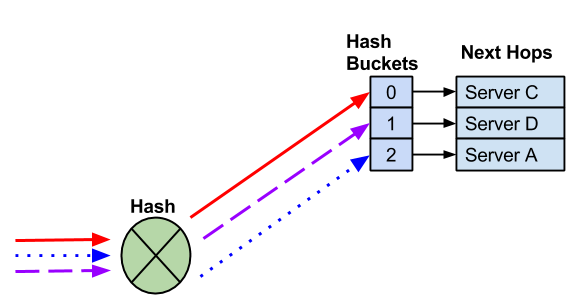
A next hop fails, which removes the next hop and hash bucket. It is possible that Cumulus Linux reassigns the remaining next hops.
In most cases, modifying hash buckets has no impact on traffic flows as the switch forwards traffic to a single end host. In deployments where multiple end hosts use the same IP address (anycast), you must use resilient hashing.
Unique Hash Seed
You can configure a unique hash seed for each switch to prevent hash polarization, a type of network congestion that occurs when multiple data flows try to reach a switch using the same switch ports.
You can set a hash seed value between 0 and 4294967295. If you do not specify a value, switchd creates a randomly generated seed.
To configure the hash seed:
cumulus@switch:~$ nv set system forwarding hash-seed 50
cumulus@switch:~$ nv config apply
Configuring the hash seed restarts the switchd service, which causes all network ports to reset, interrupts network services, and resets the switch hardware configuration.
If you do not enable NVUE, use the instructions below. If you are using NVUE to configure your switch, the NVUE commands change the settings in /etc/cumulus/datapath/nvue_traffic.conf which takes precedence over the settings in /etc/cumulus/datapath/traffic.conf.
Edit /etc/cumulus/datapath/traffic.conf file to change the ecmp_hash_seed parameter, then restart switchd.
cumulus@switch:~$ sudo nano /etc/cumulus/datapath/traffic.conf
...
#Specify the hash seed for Equal cost multipath entries
# and for custom ecmp and lag hash
# Default value: random
# Value Range: {0..4294967295}
ecmp_hash_seed = 50
...
cumulus@switch:~$ sudo systemctl restart switchd.service
Restarting the switchd service causes all network ports to reset, interrupting network services, in addition to resetting the switch hardware configuration.
cl-ecmpcalc
Run the cl-ecmpcalc command to determine a hardware hash result. For example, you can see which path a flow takes through a network. You must provide all fields in the hash, including the ingress interface, layer 3 source IP, layer 3 destination IP, layer 4 source port, and layer 4 destination port.
cl-ecmpcalc only supports input interfaces that convert to a single physical port in the port tab file, such as the physical switch ports (swp). You can not specify virtual interfaces like bridges, bonds, or subinterfaces.
cumulus@switch:~$ sudo cl-ecmpcalc -i swp1 -s 10.0.0.1 -d 10.0.0.1 -p tcp --sport 20000 --dport 80
ecmpcalc: will query hardware
swp3
If you omit a field, cl-ecmpcalc fails.
cumulus@switch:~$ sudo cl-ecmpcalc -i swp1 -s 10.0.0.1 -d 10.0.0.1 -p tcp
ecmpcalc: will query hardware
usage: cl-ecmpcalc [-h] [-v] [-p PROTOCOL] [-s SRC] [--sport SPORT] [-d DST]
                   [--dport DPORT] [--vid VID] [-i IN_INTERFACE]
                   [--sportid SPORTID] [--smodid SMODID] [-o OUT_INTERFACE]
                   [--dportid DPORTID] [--dmodid DMODID] [--hardware]
                   [--nohardware] [-hs HASHSEED]
                   [-hf HASHFIELDS [HASHFIELDS ...]]
                   [--hashfunction {crc16-ccitt,crc16-bisync}] [-e EGRESS]
                   [-c MCOUNT]
cl-ecmpcalc: error: --sport and --dport required for TCP and UDP frames
Resilient Hashing
In Cumulus Linux, when a next hop fails or you remove the next hop from an ECMP pool, the hashing or hash bucket assignment can change. For deployments where flows must always use the same next hop, this change can cause session failures. Resilient hashing is an alternate way to manage ECMP groups. Cumulus Linux assigns next hops to buckets using their hashing header fields and uses the resulting hash to index into the table of 2^n hash buckets. Because all packets in a given flow have the same header hash value, they all use the same flow bucket.
- Resilient hashing supports both IPv4 and IPv6 routes.
- Resilient hashing preserves flow stickiness when you remove next hops. Adding a next hop to an ECMP container does not guarantee flow stickiness.
When the set of next hops changes, resilient hashing behaves as follows:
- When you remove a next hop, Cumulus Linux distributes the assigned buckets to the remaining next hops.
- When you add a next hop, Cumulus Linux assigns no buckets to the new next hop until the load rebalances.
- The active timer (
active-timer) sets how long a bucket must be idle before Cumulus Linux can reassign it to the new next hop. The load rebalances when the active timer expires only if inactive buckets are available; until then, the new next hop can remain unpopulated. - The maximum unbalanced timer (
max-unbalanced-timer) sets the longest time Cumulus Linux waits for the load to balance. When this timer expires and the load is still not balanced, Cumulus Linux migrates buckets to the new next hop regardless of bucket activity, so flows on those buckets do not keep their next hop. The default value is 0, which means Cumulus Linux never forces a rebalance and waits for idle buckets.
To set the timers, refer to Configure Resilient Hashing.
When you enable resilient hashing, Cumulus Linux assigns next hops in roundrobin fashion to a fixed number of buckets. This simplified example shows 12 buckets and four next hops. The switch uses the number of buckets you configure.
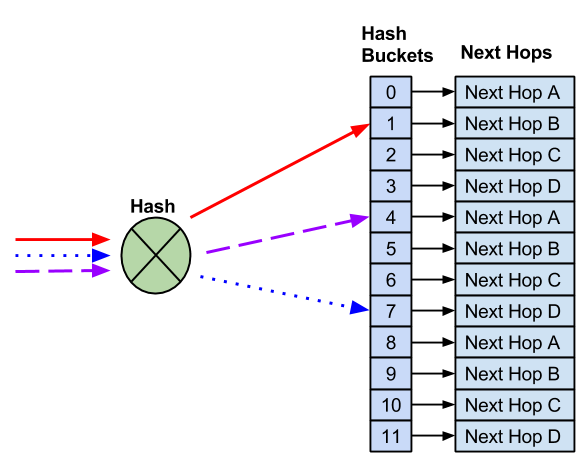
Unlike default ECMP hashing, when you need to remove a next hop, the number of hash buckets does not change.
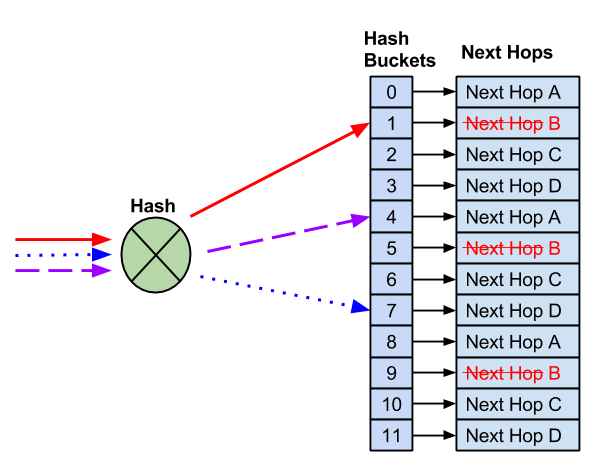
With 12 buckets and four next hops, instead of reducing the number of buckets, which moves flows to known good hosts to different next hops, the remaining next hops replace the failed next hop.
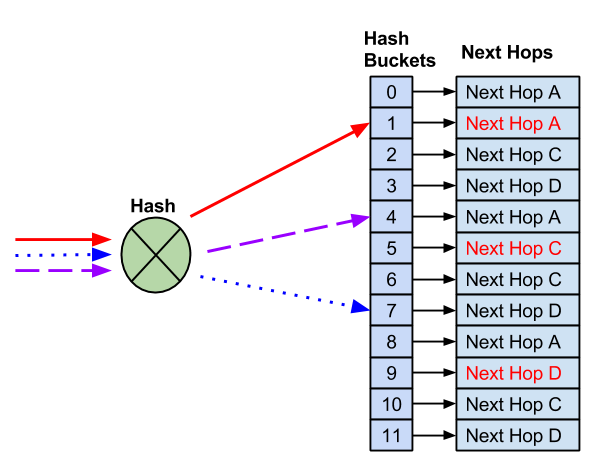
After you remove the failed next hop, the remaining next hops replace it. This preserves flow stickiness for all flows that hash to working next hops.
Resilient hashing does not guarantee flow stickiness when you add new next hops. Because there are a fixed number of buckets, a new next hop requires reassigning next hops to buckets.
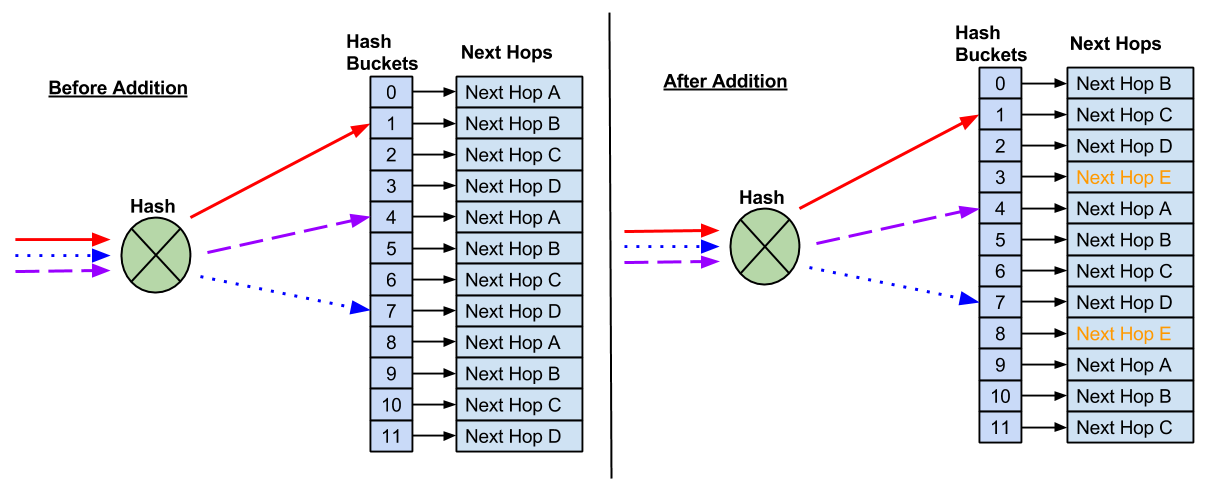
As a result, some flows hash to new next hops, which can affect anycast deployments.
Cumulus Linux does not enable resilient hashing by default. When you enable resilient hashing, all ECMP groups share a fixed pool of buckets. To see the ECMP resources on the switch, run the nv show platform asic <asic-id> resource command. Refer to Resource Diagnostics. An ECMP group is a list of unique next hops that multiple ECMP routes reference.
An ECMP route counts as a single route with multiple next hops.
All ECMP routes must use the same number of buckets (you cannot configure the number of buckets per ECMP route).
A larger number of ECMP buckets reduces the number of flows that move to a different next hop when you add a new next hop to an ECMP route. However, the system supports fewer ECMP routes. If you install the maximum number of ECMP routes, new ECMP routes log an error and do not install.
You can configure route and MAC address hardware resources depending on ECMP bucket size changes. See NVIDIA Spectrum routing resources.
Configure Resilient Hashing
To configure resilient hashing:
- Set resilient hashing to enabled.
- Set the number of hash buckets to use for all ECMP routes. On Spectrum switches, you can set the number of buckets to 64, 512, 1024, 2048, or 4096. On NVIDIA Spectrum-2 and later, you can set the number of buckets to 64, 128, 256, 512, 1024, 2048, or 4096. The default value is 64.
- Set the number of milliseconds an idle bucket waits before being reassigned to a new next hop after a next hop addition event. You can specify a value between 1 and 65535. The default value is 120.
- Set the maximum number of milliseconds Cumulus Linux waits before forcing a rebalance across next hops, regardless of bucket activity. You can specify a value between 0 and 4294967294. A value of 0 means Cumulus Linux never forces a rebalance and instead waits indefinitely for an idle bucket. The default value is 0.
Enabling or disabling resilient hashing reloads switchd and restarts the FRR service. FRR withdraws and reinstalls every route during the restart. NVUE also configures FRR to stop installing next hop group IDs in the kernel as part of enabling resilient hashing — see Resilient Hashing and Next Hop Groups below. Plan for a brief, fabric-wide disruption when you change the resilient hashing state, and schedule the change for a maintenance window.
The following example enables resilient hashing, sets the number of hash buckets to use for all ECMP routes to 512, sets the number of milliseconds an idle bucket waits before being reassigned to a new next hop after a next hop addition event to 500, and sets the maximum number of milliseconds Cumulus Linux waits before forcing a rebalance to 2000.
cumulus@switch:~$ nv set system forwarding resilient-hash state enabled
cumulus@switch:~$ nv set system forwarding resilient-hash bucket-size 512
cumulus@switch:~$ nv set system forwarding resilient-hash active-timer 500
cumulus@switch:~$ nv set system forwarding resilient-hash max-unbalanced-timer 2000
cumulus@switch:~$ nv config apply
Changing the bucket size rebuilds every existing resilient ECMP container. Cumulus Linux does not preserve flow-to-bucket pinning for flows on those containers, so flow stickiness is not preserved for them, even though the change does not reload switchd or restart FRR. Changing the active timer or the maximum unbalanced timer applies the new value to existing resilient containers immediately and does not affect flow stickiness for existing flows.
To disable resilient hashing, run the nv set system forwarding resilient-hash state disabled command.
Edit the /etc/cumulus/datapath/traffic.conf file, then restart switchd with the sudo systemctl restart switchd.service command.
cumulus@switch:~$ sudo nano /etc/cumulus/datapath/traffic.conf
# Enable resilient hashing
resilient_hash_enable = TRUE
# Resilient hashing flowset entries per ECMP group
#
# Mellanox Spectrum platforms:
# Valid values - 64, 512, 1024, 2048, 4096
#
# Mellanox Spectrum2/3 platforms
# Valid values -  64, 128, 256, 512, 1024, 2048, 4096
#
resilient_hash_entries_ecmp = 512
#
resilient_hash_active_timer = 500
#
resilient_hash_max-unbalanced-timer = 2000
To show resilient hashing information, such as its state (enabled or disabled), the number of hash buckets, the active timer, and the maximum unbalanced timer, run the nv show system forwarding resilient-hash command.
cumulus@switch:~$ nv show system forwarding resilient-hash
                      operational  applied
--------------------  -----------  -------
state                 enabled      enabled
bucket-size           512          512
active-timer          500          500
max-unbalanced-timer  2000         2000
Considerations
Be aware of the following considerations when configuring resilient hashing.
Resilient Hashing and Next Hop Groups
Resilient hashing in hardware does not work with next hop groups; the switch remaps flows to new next hops when the set of next hops changes. When you enable resilient hashing through NVUE, NVUE configures zebra not to install next hop IDs in the kernel for you, and restarts FRR to apply the change.
If you configure resilient hashing by editing /etc/cumulus/datapath/traffic.conf directly, configure zebra not to install next hop IDs in the kernel yourself with the following vtysh command:
cumulus@switch:~$ sudo vtysh
switch# configure terminal
switch(config)# zebra nexthop proto only
switch(config)# exit
switch# write memory
switch# exit
cumulus@switch:~$
Adaptive Routing
Resilient hashing and adaptive routing are mutually exclusive. If you try to enable resilient hashing while adaptive routing is active, Cumulus Linux rejects the change with Cannot enable resilient hashing while adaptive routing is active. If you try to enable adaptive routing while resilient hashing is active, Cumulus Linux rejects the change with Cannot enable Adaptive Routing while resilient hashing is active.
BGP Data Center Prefix Independent Convergence
Resilient hashing does not support BGP data center prefix independent convergence (BGP DC PIC).
Upgrade from an Earlier Release
If you configured resilient hashing in an earlier release by editing the /etc/cumulus/datapath/traffic.conf file, you must reconfigure resilient hashing after you upgrade.
IPv6 Route Replacement
When the router adds or removes ECMP paths, or when the next hop IP address, interface, or tunnel changes, the next hop information for an IPv6 prefix can change. FRR deletes the existing route to that prefix from the kernel, then adds a new route with all the relevant new information. In certain situations, Cumulus Linux does not maintain resilient hashing for IPv6 flows.
To work around this issue, you can enable IPv6 route replacement.
For certain configurations, IPv6 route replacement can lead to incorrect forwarding decisions and lost traffic. For example, it is possible for a destination to have next hops with a gateway value with the outbound interface or just the outbound interface itself, without a gateway address. If both types of next hops for the same destination exist, route replacement does not operate correctly; Cumulus Linux adds an additional route entry and next hop but does not delete the previous route entry and next hop.
To enable the IPv6 route replacement option, in the /etc/frr/daemons file, add the --v6-rr-semantics configuration option to the zebra daemon definition, then reload FRR with the sudo systemctl reload frr.service command.
cumulus@switch:~$ sudo nano /etc/frr/daemons
...
vtysh_enable=yes
zebra_options=" -M cumulus_mlag -M snmp -A 127.0.0.1 --v6-rr-semantics -s 90000000"
bgpd_options=" -M snmp  -A 127.0.0.1"
ospfd_options=" -M snmp -A 127.0.0.1"
...
To verify that IPv6 route replacement, run the systemctl status frr command:
cumulus@switch:~$ systemctl status frr

    ● frr.service - FRRouting
      Loaded: loaded (/lib/systemd/system/frr.service; enabled; vendor preset: enabled)
      Active: active (running) since Mon 2020-02-03 20:02:33 UTC; 3min 8s ago
        Docs: https://frrouting.readthedocs.io/en/latest/setup.html
      Process: 4675 ExecStart=/usr/lib/frr/frrinit.sh start (code=exited, status=0/SUCCESS)
      Memory: 14.4M
      CGroup: /system.slice/frr.service
            ├─4685 /usr/lib/frr/watchfrr -d zebra bgpd staticd
            ├─4701 /usr/lib/frr/zebra -d -M snmp -A 127.0.0.1 --v6-rr-semantics -s 90000000
            ├─4705 /usr/lib/frr/bgpd -d -M snmp -A 127.0.0.1
            └─4711 /usr/lib/frr/staticd -d -A 127.0.0.1
Troubleshoot Resilient Hashing
To confirm whether an ECMP group is actually using a resilient container in hardware, generate a cl-support file and search the ROUTER_0.json file it contains.
| To find | Search for |
|---|---|
| Whether resilient hashing is programmed at all | "ECMP type": "Resilient" |
| The hash buckets for one resilient container | "ECMP HW Entry" blocks under that container |
| Which route uses which container | "ECMP ID" under the IPv4 or IPv6 unicast routes |
| The timer values as currently programmed | "Active timer (ms)" and "Max unbalanced time (ms)" |
To see the live hardware state on the console instead of waiting for a cl-support file, run:
cumulus@switch:~$ echo true | sudo tee /cumulus/switchd/ctrl/hw/enable
cumulus@switch:~$ echo true | sudo tee /cumulus/switchd/ctrl/hw/nexthop
cumulus@switch:~$ sudo cat /cumulus/switchd/run/hw/nexthop/all
Adaptive Routing
Adaptive routing is a load balancing feature that improves network utilization for adaptive routing eligible IP packets by selecting forwarding paths dynamically based on the state of the switch, such as queue occupancy and port utilization.
The benefits of using adaptive routing include:
- The switch can forward adaptive routing eligible IP packets over all the available ECMP member ports to maximize the total traffic throughput, while removing potential ECMP flow collisions.
- The switch distributes incoming traffic equally (or according to their weights) between the available IP next hops, which helps to minimize latency and network congestion.
- If the cumulative rate of one or more flows exceeds the link bandwidth of the individual uplink port, adaptive routing can distribute the traffic dynamically between multiple uplink ports; the available bandwidth for these flows is not limited to the link bandwidth of an individual uplink port.
With adaptive routing, the switch forwards adaptive routing eligible packets to the less loaded path on a per packet basis to best utilize the fabric resources and avoid congestion. The change decision for port selection is set to one microsecond; you cannot change it.
Cumulus Linux supports ECMP resource optimization for adaptive routing, which addresses the requirement of large numbers of ECMP groups during routing protocol convergence in transient scenarios.
Cumulus Linux supports adaptive routing with:
- Switches with the Spectrum-4 and later ASIC.
- Adaptive routing eligible RoCE2 unicast traffic.
- VXLAN-encapsulated RoCE traffic.
- Layer 3 interfaces.
- Next hop router interfaces in the default VRF.
- The NVIDIA Spectrum-X networking platform, which accelerates AI network performance. For information about NVIDIA Spectrum-X, refer to NVIDIA Spectrum-X networking platform.
- For additional implementation requirements for adaptive routing consult the Spectrum-X Deployment Guide.
- Adaptive routing does not make use of resilient hashing.
- Cumulus Linux does not support adaptive routing on layer 3 subinterfaces, SVIs, bonds or bond members.
- The Spectrum-4 switch does not support adaptive routing on 800G links.
- Adaptive routing is only supported on the NVIDIA Spectrum-X networking platform, which accelerates AI network performance. For information about NVIDIA Spectrum-X, refer to NVIDIA Spectrum-X networking platform.
Cumulus Linux also supports BGP W-ECMP with adaptive routing; see BGP Weighted Equal Cost Multipath .
Enable Adaptive Routing
To enable adaptive routing globally, run the nv set router adaptive-routing state enabled command:
cumulus@switch:~$ nv set router adaptive-routing state enabled
cumulus@switch:~$ nv config apply
To enable adaptive routing on ports that are part of the same ECMP route, run the nv set interface <interface-id> router adaptive-routing state enabled command.
cumulus@switch:~$ nv set interface swp51 router adaptive-routing state enabled
cumulus@switch:~$ nv set interface swp52 router adaptive-routing state enabled
cumulus@switch:~$ nv config apply
To disable adaptive routing, run the nv set router adaptive-routing state disabled command. To disable adaptive routing on a specific port, run the nv set interface <interface-id> router adaptive-routing state disabled command.
Enabling or disabling adaptive routing globally or on an interface reloads the switchd service.
Edit the /etc/cumulus/switchd.d/adaptive_routing.conf file:
- Set the
adaptive_routing.enableparameter toTRUEto enable the adaptive routing feature. - Set the
interface.<port>.adaptive_routing.enableparameter toTRUEin thePer-port configurationsection to enable adaptive routing on all the ports that are part of the same ECMP route.
cumulus@switch:~$ sudo nano /etc/cumulus/switchd.d/adaptive_routing.conf
## Global adaptive-routing enable/disable setting
adaptive_routing.enable = TRUE
...
## Per-port configuration
interface.swp51.adaptive_routing.enable = TRUE
interface.swp51.adaptive_routing.link_util_thresh = 70
interface.swp52.adaptive_routing.enable = TRUE
interface.swp52.adaptive_routing.link_util_thresh = 70
...
Reload switchd with the sudo systemctl reload switchd.service command.
- To disable adaptive routing, set the
adaptive_routing.enableparameter toFALSEin the/etc/cumulus/switchd.d/adaptive_routing.conffile. - To disable adaptive routing on a specific port, set the
interface.<port>.adaptive_routing.enableparameter toFALSEin the/etc/cumulus/switchd.d/adaptive_routing.conffile.
- When you enable adaptive routing, Cumulus Linux uses the default profile settings for your switch ASIC type. If you need to make adjustments to the settings, contact NVIDIA Customer Support.
- Ensure that traffic intended for adaptive routing is routed over ports with adaptive routing enabled. Unexpected route hashing might occur when mixing adaptive routing traffic and regular ECMP routes egressing ports that do not have adaptive routing enabled.
LAG Hash Randomizer
When you enable adaptive routing, Cumulus Linux enables the LAG hash randomizer, which enables packet spraying on layer 3 bonds on the switch for adaptive routing eligible packets coming from the network and destined towards the NICs. This switch functionality aids the packet load balancer on the NICs for end-to-end performance and fully integrates with adaptive routing for congestion avoidance and load balancing, preserving in-order delivery for non-adaptive routing traffic while maximizing bandwidth utilization for adaptive routing flows.
The LAG hash randomizer is used for leaf switches if there is more than one link connected between the switch and the NIC, and there is a bond configured between the switch and the NIC.
LAG hash randomizer is supported on a Spectrum-4 or later and only for static layer 3 bonds.
Link Utilization
Link utilization, when crossing a threshold, is one of the parameters in the adaptive routing decision. The default link utilization threshold percentage on an interface is 70. If you enable the adaptive routing profile-custom, you can change the percentage to a value between 1 and 100.
Link utilization is off by default; you must enable the global link utilization setting to use the link utilization thresholds set on adaptive routing interfaces. You cannot enable or disable link utilization per interface.
- You can enable link utilization only when you enable the adaptive routing
profile-custom.
The following example enables link utilization and uses the default link utilization threshold percentage of 70:
cumulus@switch:~$ nv set router adaptive-routing link-utilization-threshold enabled
cumulus@switch:~$ nv config apply
The following example changes the link utilization threshold percentage to 100 on swp51 and enables link utilization:
cumulus@switch:~$ nv set interface swp51 router adaptive-routing link-utilization-threshold 100
cumulus@switch:~$ nv set router adaptive-routing link-utilization-threshold enabled
cumulus@switch:~$ nv config apply
Enabling or disabling link utilization reloads the switchd service.
Edit the /etc/cumulus/switchd.d/adaptive_routing.conf file to set:
interface.<interface-id>.adaptive_routing.link_util_threshto a value between 1 and 100.adaptive_routing.link_util_threshold_disabledto TRUE.
cumulus@switch:~$ sudo nano /etc/cumulus/switchd.d/adaptive_routing.conf
## Global adaptive-routing enable/disable setting
adaptive_routing.enable = TRUE

## Global Link-utilization-threshold on/off
adaptive_routing.link_utilization_threshold_disabled = TRUE

## Per-port configuration
interface.swp51.adaptive_routing.enable = TRUE
interface.swp51.adaptive_routing.link_util_thresh = 100
Reload switchd with the sudo systemctl reload switchd.service command.
Example Configuration
The following example enables adaptive routing on swp51 and swp52. Global link utilization is off (the default setting).
cumulus@switch:~$ nv set interface swp51 router adaptive-routing state enabled
cumulus@switch:~$ nv set interface swp52 router adaptive-routing state enabled
cumulus@switch:~$ nv config apply
The following example enables adaptive routing on swp51 and swp52, sets the link utilization threshold percentage to 100 on both swp51 and swp52, and enables global link utilization:
cumulus@switch:~$ nv set interface swp51 router adaptive-routing state enabled
cumulus@switch:~$ nv set interface swp52 router adaptive-routing state enabled
cumulus@switch:~$ nv set interface swp51 router adaptive-routing link-utilization-threshold 100
cumulus@switch:~$ nv set interface swp52 router adaptive-routing link-utilization-threshold 100
cumulus@switch:~$ nv set router adaptive-routing link-utilization-threshold enabled
cumulus@switch:~$ nv config apply
The following example enables adaptive routing on swp51 and swp52. Global link utilization is off (the default setting).
cumulus@switch:~$ sudo nano /etc/cumulus/switchd.d/adaptive_routing.conf
## Global adaptive-routing enable/disable setting
adaptive_routing.enable = TRUE

## Global Link-utilization-threshold on/off
adaptive_routing.link_utilization_threshold_disabled = FALSE

## Per-port configuration
interface.swp51.adaptive_routing.enable = TRUE
interface.swp51.adaptive_routing.link_util_thresh = 0
interface.swp52.adaptive_routing.enable = TRUE
interface.swp52.adaptive_routing.link_util_thresh = 0
...
Reload switchd with the sudo systemctl reload switchd.service command.
The following example enables adaptive routing on swp51 and swp52, sets the link utilization threshold percentage to 100 on both swp51 and swp52, and enables global link utilization.
cumulus@switch:~$ sudo nano /etc/cumulus/switchd.d/adaptive_routing.conf
## Global adaptive-routing enable/disable setting
adaptive_routing.enable = TRUE

## Global Link-utilization-threshold on/off
adaptive_routing.link_utilization_threshold_disabled = TRUE

## Per-port configuration
interface.swp51.adaptive_routing.enable = TRUE
interface.swp51.adaptive_routing.link_util_thresh = 100
interface.swp52.adaptive_routing.enable = TRUE
interface.swp52.adaptive_routing.link_util_thresh = 100
Reload switchd with the sudo systemctl reload switchd.service command.
ECMP Group Segregation
ECMP group segregation is supported only on switches with the Spectrum-6 ASIC. Earlier ASICs always merge equivalent adaptive routing ECMP groups.
Adaptive routing can select an egress port in round-robin order, spraying packets across the ports in the group. The round-robin state for a group lives in the ASIC, and by default two adaptive routing ECMP groups that resolve to the same member ports share one hardware entry, and therefore one round-robin pointer. Their traffic distributions are correlated instead of independent. ECMP group segregation gives each adaptive routing ECMP group its own entry and its own round-robin pointer, which improves tail latency. Tail latency matters for AI training, where GPUs synchronize periodically and a single late packet stalls the whole cluster.
Segregation applies only to adaptive routing ECMP groups. Cumulus Linux continues to merge equivalent ECMP groups that are not adaptive routing eligible.
Segregation keeps apart the ECMP groups that the routing daemon already treats as distinct. Where the routing daemon merges routes into one nexthop group, the switch programs one adaptive routing group and segregation has no effect.
Configure ECMP Group Segregation
There is no NVUE command for segregation and no separate setting to turn it on. Cumulus Linux enables segregation when adaptive routing is enabled and the custom adaptive routing profile selects round-robin port selection with ar.psm. Cumulus Linux reads the profile from the /etc/cumulus/switchd.d/ar_profile_custom.conf file, so you configure it either by editing the file directly or by writing the file with an NVUE flexible snippet.
Before you configure segregation, enable adaptive routing and select the custom profile with the nv set router adaptive-routing profile profile-custom command:
cumulus@switch:~$ nv set router adaptive-routing profile profile-custom
cumulus@switch:~$ nv config apply
-
Create a flexible snippet in
yamlformat that setsar.psmto 1:cumulus@switch:~$ sudo nano /home/cumulus/ar-round-robin.yaml - set: system: config: snippet: ar-round-robin: file: "/etc/cumulus/switchd.d/ar_profile_custom.conf" content: | ar.psm = 1 -
Patch the configuration with the fully qualified path to the file:
cumulus@switch:~$ nv config patch /home/cumulus/ar-round-robin.yaml -
Apply the configuration:
cumulus@switch:~$ nv config apply
Edit the /etc/cumulus/switchd.d/ar_profile_custom.conf file:
cumulus@switch:~$ sudo nano /etc/cumulus/switchd.d/ar_profile_custom.conf
ar.psm = 1
Cumulus Linux latches the grouping mode when switchd starts and does not change it while the switch runs. To move between merged and segregated grouping, you must restart switchd, which disrupts forwarding across the whole switch. Plan the change for a maintenance window.
Do not change ar.psm as part of an ISSU upgrade. ISSU fails when the grouping mode changes during the reconfiguration stage.
Segregation consumes more hardware group table entries than merging, because equivalent groups no longer share an entry. On a Spectrum-6 switch in a standard two-level fat tree, the table is large enough for every destination group, including during an ISSU upgrade, when only half the table is available.
The nv show router adaptive-routing command does not show the grouping mode. switchd logs the port selection mode it resolves and the grouping mode it programs, so check /var/log/switchd.log to confirm which mode the switch is running:
cumulus@switch:~$ sudo grep -iE "port select mode|grouping mode" /var/log/switchd.log
Show Adaptive Routing Settings
To show adaptive routing settings, run the nv show router adaptive-routing command:
cumulus@leaf01:mgmt:~$ nv show router adaptive-routing
                            operational   applied
--------------------------  ------------  -------
state                       enabled       enabled
To show adaptive routing configuration for an interface, run the nv show interface <interface-id> router adaptive-routing.
Considerations
IPv6 Next Hop Preference
Cumulus Linux uses IPv6 link-local addresses as BGP next hops when receiving a route with both link-local and global next hops. To configure a BGP peering to prefer global next hop addresses, configure the ipv6-nexthop-prefer-global option in an inbound route map applied to the peer. Use this configuration when there are multiple BGP peerings to the same router with adaptive routing enabled, or multiple peerings to the same router on interfaces that share the same MAC address or physical interface. Refer to Set IPv6 Prefer Global.